Naver launched three new features in September and October 2026. These help people keep pet health records and find restaurants more easily.
Pet Hospital Records in One Place
On September 17, Naver opened Pet Notebook beta. This service collects your pet’s hospital visit history from different clinics into one view on Naver.
You can see visits from the past three years. Each card shows the date, hospital name, whether it was a checkup, and the diagnosis. You can filter by pet if you have more than one. Tap a hospital name to open its Place page.
Hospitals must use the IntoCNS electronic chart system for records to appear. For more details, check the IntoPet app. Each visit card also shows a short AI summary. You can open the full report. The AI text is only a guide. It may not match the real visit. Always talk to a vet for medical decisions.
If you booked through Naver, you also see buttons for reservation details, writing a review, and booking again.
Naver plans to add more hospitals and useful features later.
More Restaurant Details Before You Visit
On September 22, Naver improved Place pages for restaurants.
The info tab now shows cards for things people often check: whether the place is a no-kids zone, if private rental is possible, if you must order drinks, kids’ menu options, and birthday benefits. Owners write the exact notes.
The menu screen is clearer. Categories sit at the top so you jump straight to what you want. Recommended or new items appear first. For course meals, you see the price and the order of dishes. Tap a course to read descriptions and see photos.
Open any menu item for up to 10 photos, extra options, order rules, and reviews. Search results for a restaurant name also show popular menus and course details.
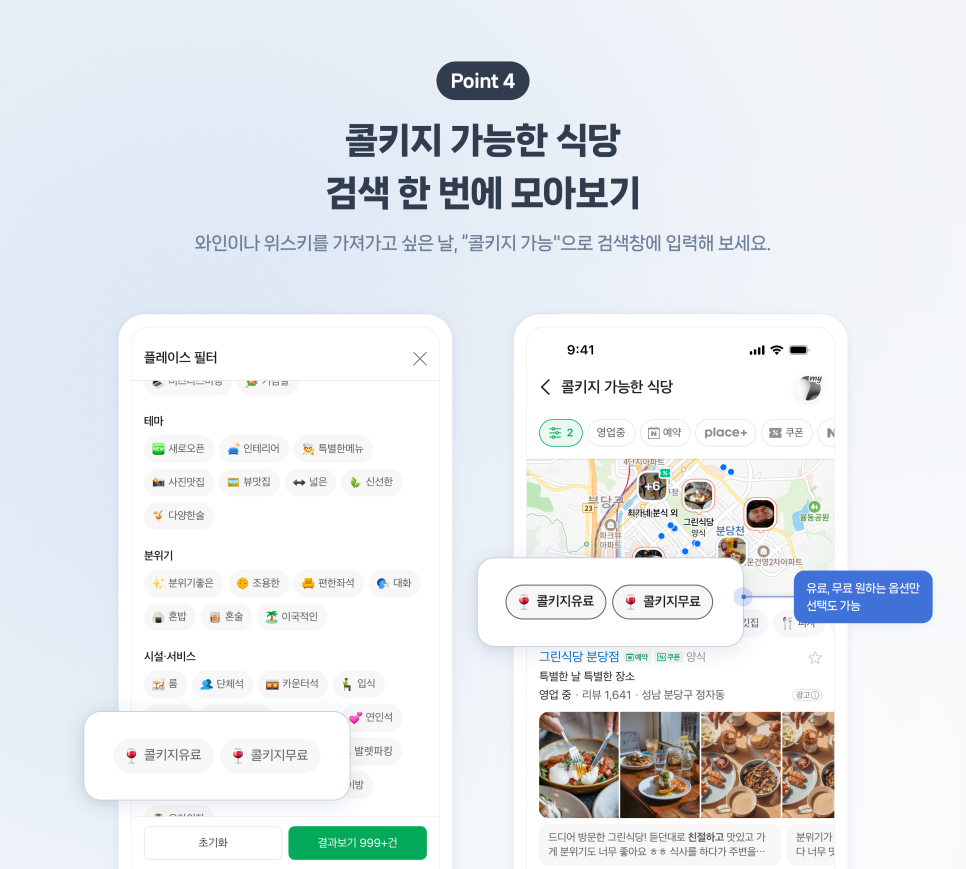
Corkage search is simpler. Search for “corkage possible” or “bring your own wine” and Naver lists both free and paid places together. Use “corkage free” or “corkage paid” to narrow the list. On the restaurant page you can see which drinks are allowed and the fee. Only places that register the information show these details.
Restaurant Search Shows More Choices
On October 2, Naver rolled out a new restaurant search after testing. When you search for a place name plus “matjip” (tasty restaurants), you still see the usual list. You also get themed recommendations and a rising-popularity list.
Themes consider your past activity plus the area, menu type, time of day, weather, and why you are going out. Examples include “popular at lunch,” “soups for a rainy day,” or “based on your history.”
The rising list uses recent data such as directions, bookings, reviews, and saves. It highlights places that are getting more attention now.
This works in several areas, including Gangneung, Gyeongju, Gwanggyo, Gwanghwamun, Daejeon, Bundang, Seongsu, Yeosu, Jamsil, and Haeundae.
Naver says it will keep expanding the search so people can discover more places that fit their needs.
These updates are available in Naver Search and the Naver Map app. Check your own Place pages or search for restaurants and pets to try them.
https://blog.naver.com/naver_search/224412705136
https://blog.naver.com/naver_search/224414717958
https://blog.naver.com/naver_search/224427436349