Naver Search added three updates for money and homes. You can hear company earnings calls live. You also get more stock and market numbers in one place. And apartment searches show prices, listings, and school info faster.
Live earnings calls on Naver Search
From October 22, you can listen to earnings calls for about 80 Korean listed companies right in Naver Search. An earnings call is a phone meeting after a company shares its quarterly results. Leaders explain the numbers and answer questions from analysts and investors. You see the schedule when you search a company. You can listen live while it happens. You can also play it again later. After the call, AI makes a short summary of the main results and key points. It splits the summary into profits, finances, main business, and future plans. LG Display started it on October 22. SK Hynix had one on October 28. Samsung Electronics had one on October 29. Search the company name on Naver to check the schedule or listen.
Clearer economic numbers at a glance
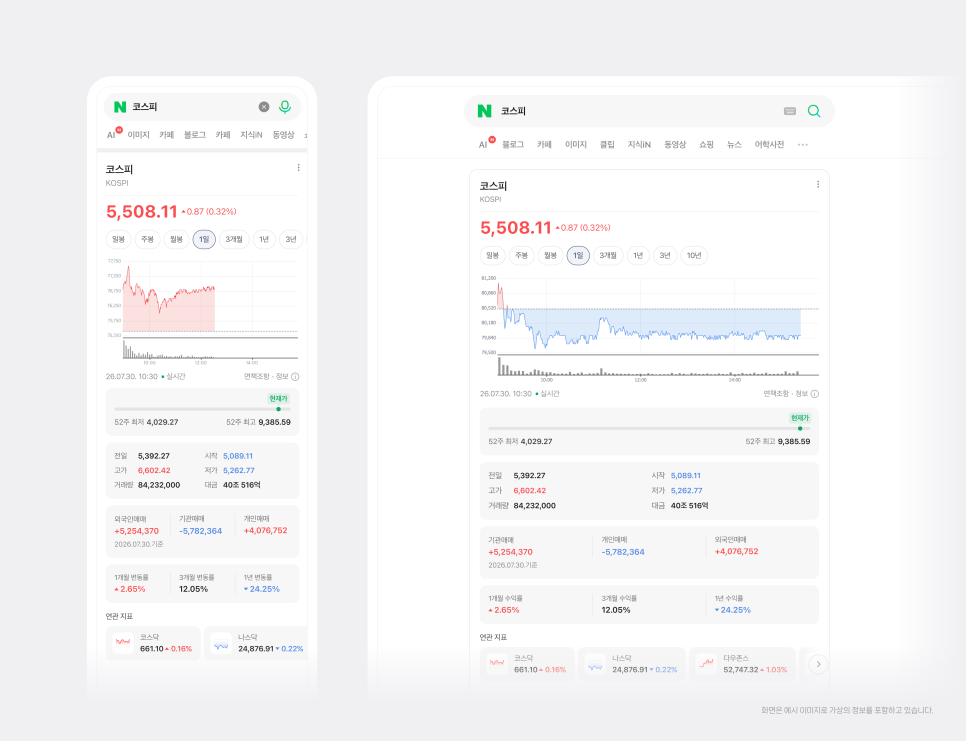
Naver also updated searches for stock indexes, market indicators, and exchange rates. Stock indexes include KOSPI (Korea’s main stock index), Nasdaq, S&P 500, and Nikkei 225. Market indicators include gold, WTI oil, copper, and the dollar index. Exchange rates cover the US dollar, Japanese yen, and euro. The top of the search result now shows the current price, how much it changed, and the 52-week high and low. You also see yesterday’s close, open, high, low, volume, and trading value on the same screen. For stock indexes, it adds how much foreigners, institutions, and individual investors bought or sold. It shows 1-month, 3-month, and 1-year change rates. Exchange rates now run 24 hours a day, so you can check moves at night. AI writes a short market briefing for gold, oil, copper, and major currencies. Related indicators appear with small charts so you can compare them quickly. When you search an index, you see its main stocks with prices. You can click straight to them. Popular posts from discussion rooms show what other people are saying.
Faster apartment and home info
Search any apartment complex name across Korea. The result shows the current price, a chart, available listings, and assigned schools in one view. You also get AI notes on the complex, a VR tour of units, and short stories about the place. For each size of unit, you see the number of listings, the price, estimated loan interest and limit, and the VR tour. You can switch between pyeong and square meters. The chart puts the highest price, lowest price, current listing prices, and actual sale prices together. Drag the chart to see past deals. It also suggests other popular complexes in the same neighborhood.
These changes let you check company calls, market numbers, and home details without jumping between many pages. Search the company, index, or apartment name on Naver to see them.
https://blog.naver.com/naver_search/224454460900
https://blog.naver.com/naver_search/224363050390
https://blog.naver.com/naver_search/224354660164