Naver recently shared three updates about search. These changes affect how sites show up and how people find more information after a search.
What counts as spam on Naver
Naver published a list of spam types that can hurt a site’s ranking or get pages removed from results. The goal is to protect users and keep useful content visible.
Here are the main types they listed:
– Cloaking: You show one page to people and a different page to the search robot.
– Bad redirects: You force people to a page that does not match what they searched for.
– Link spam: You add many links that point to spam sites, often by using weak boards or forms.
– Fake backlinks: You create lots of links just to sell the site or pass value to another domain.
– Expired domain abuse: You buy an old trusted domain and put unrelated spam content on it.
– Fake activity: You use scripts or many accounts to boost views, comments, or recommendations.
– Hacked content: Someone adds spam links or bad code to your site without your knowledge. Check your pages with the URL Inspection tool in Search Advisor.
– Malware: You try to install harmful software without clear permission.
– Hidden text: You hide keywords by making the text the same color as the background or very small.
– Keyword stuffing: You repeat the same words many times just to rank higher.
– Clickbait titles: The title or description does not match the real content.
– Mass low-quality pages: You publish many near-identical pages, often with automation.
– Scraping: You copy other people’s content and publish it as your own.
– Harmful or illegal content: This includes adult material, gambling, or anything that breaks the law.
– Misleading pages: Fake phone numbers, wrong addresses, or AI-generated images that can trick people.
– Fake government sites: Sites that copy official logos and ask for personal information or money.
– Phishing: Pages that look like Naver login or security pages to steal passwords.
– Attacks on Naver services: Using bots to flood systems or scrape data without permission.
If Naver finds these issues, the site can lose rankings or disappear from results. You can report spam through their form. They also shared a guide for good content practices.
Changes to how results look
Starting October 15, 2026, Naver updated the design of search results for web pages, blogs, cafes, Knowledge iN, and videos.
Site owners should note three changes:
1. Favicons now appear larger. The recommended size is 32 pixels or bigger so they stay clear.
2. Structured data (extra details like ratings, addresses, or recipes) now shows in a simpler summary under the main text. Some fields no longer appear.
3. HowTo markup no longer creates special step-by-step result boxes. Your pages still get indexed and ranked the same way. You do not need to remove the markup.
Breadcrumbs now sit on the second line of the site information.
Related questions after you search
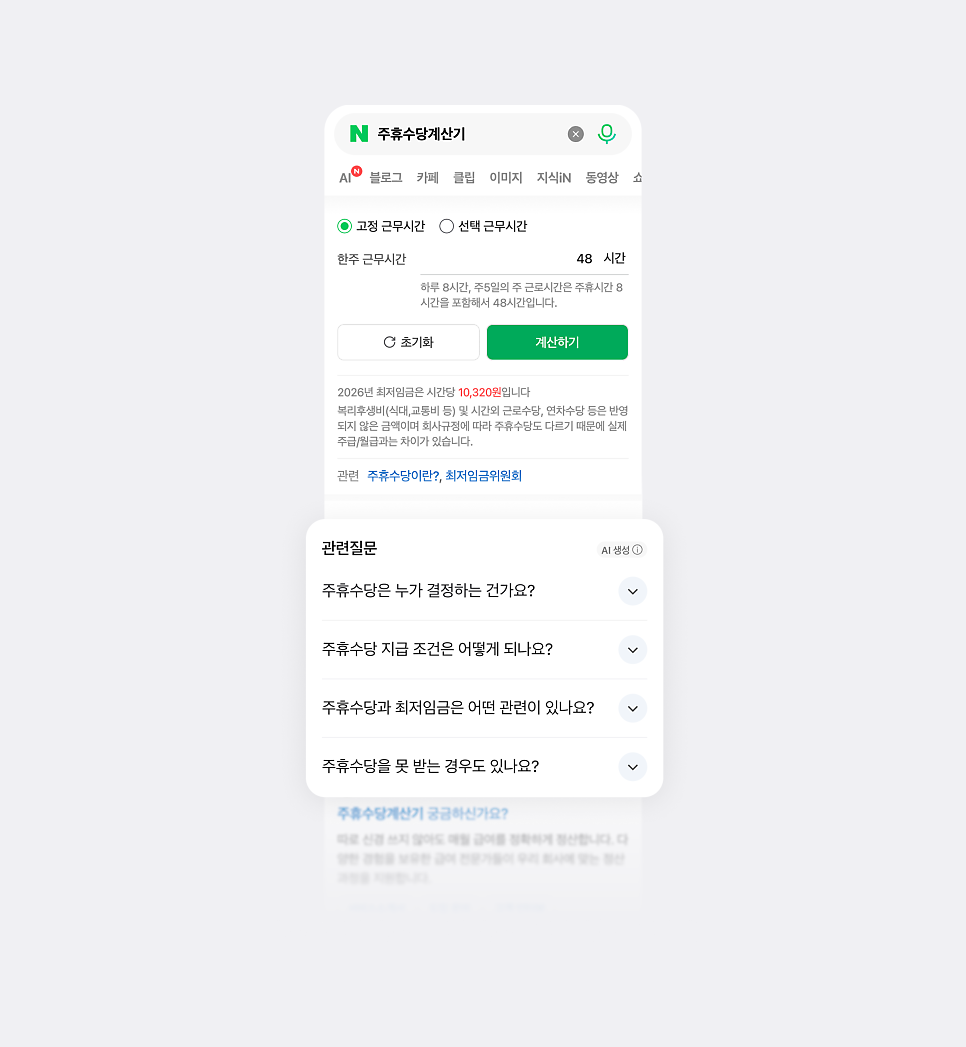
From October 22, 2026, Naver expands the related questions feature.
After certain searches, you will see a separate box with follow-up questions that fit the topic. Clicking a question opens the answer right there. You do not need to start a new search.
This helps when one search leads to more questions. Naver says the questions consider the context of what you are looking for, not just similar keywords.
These three updates cover how Naver fights spam, how result pages look, and how people can keep exploring information. Site owners should check their favicons, review structured data, and avoid the spam practices listed above. Users will see cleaner results and easier ways to ask related questions.
https://blog.naver.com/naver_search/224335446939
https://blog.naver.com/naver_webmaster/224442540254
https://blog.naver.com/naver_search/224435385907